
VISITOR CONNECT®
Turn Anonymous Website Interest Into Actionable Prospects
Visitor Connect® identifies eligible anonymous website visitors and transforms demonstrated website interest into actionable prospect records for direct mail, email, and other permitted marketing applications.
Go beyond basic visitor identification with tools to prioritize the right visitors, personalize follow-up, apply geographic and audience qualification rules, and integrate leads into your marketing workflow.
Turn Website Visits Into Reachable Prospects
1. They Visit
An anonymous prospect visits your website and demonstrates interest in your organization, products, services, or content.
2. Visitor Connect Identifies
Visitor Connect attempts to match eligible visitors to actionable person-level contact information.
3. You Reach Them
Use the resulting audience for direct mail, email, and other appropriate marketing applications.
The real power comes from deciding which visitors you want to identify and reach—and what additional information you want to use.
More Than Website Visitor Identification
Identify
Transform otherwise anonymous website activity into actionable prospect records.
Prioritize
Apply engagement, behavioral, geographic, demographic, suppression, and predictive criteria to focus on the visitors most worth reaching.
Personalize
Use browsing behavior and optional demographic, persona, predictive, and location intelligence to make follow-up more relevant.
Integrate
Deliver Visitor Connect audiences through files, SFTP, APIs, Zapier, and other supported workflows.
Turn Anonymous Interest Into Actionable Audience Data
For eligible identified visitors, Visitor Connect can provide person-level information you can put to work in direct mail, email, and other permitted marketing applications.
Core Information
- Name
- Home address
- Personal email
Optional / Enhanced Data
- Mobile phone
- Work email
- Additional demographic, household, property, persona, predictive, or geographic information when selected
Not every visitor can be identified, and not every field is available for every identified visitor. Visitor Connect uses multiple identity sources designed to improve identification coverage of eligible visitors.
Don't Treat Every Website Visitor the Same
A website visit demonstrates interest—but not every visitor has the same level of engagement, relevance, or likelihood to convert. Visitor Connect gives marketers controls to determine which visitors should become actionable prospects before spending money to reach them.
Engagement
Set minimum requirements based on pages viewed and/or time on site.
Page-Level Behavior
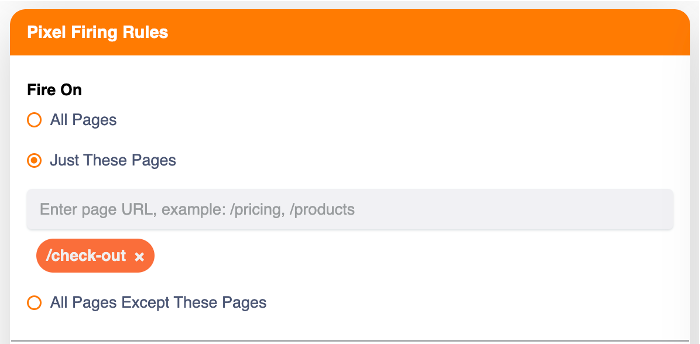
Choose which pages should trigger identification and which should prevent it—for example, focus on high-value product or service pages while excluding visitors who already reached a conversion or confirmation page.
Customer Suppression
Upload existing customers or other suppression records—using appropriate identifying information or hashed email—so they can be excluded from prospecting output.
Geographic Qualification
Limit prospects to appropriate ZIP codes, states, service territories, or other supported geographic definitions.
Demographic Qualification
Apply business rules to flag or qualify visitors using selected demographic criteria.
Predictive Scoring
Where a custom predictive model is available, append a predictive score to help prioritize visitors based on modeled conversion propensity.
Visitor Connect helps move the question from “Who visited?” to “Which visitors are worth reaching?”
Control When Visitor Connect Fires
Configure Visitor Connect around the website behaviors that matter to your use case. These controls are set in the Visitor Connect interface, so marketers don't have to build every filtering rule separately in a tag manager.
- Fire on all pages or selected pages
- Prevent firing on selected pages
- Use page or URL/query-string rules where supported
- Require minimum page views
- Require minimum time on site
- Combine engagement rules with other qualification criteria
Turn Website Behavior Into More Relevant Follow-Up
Identifying a visitor is only part of the opportunity. Visitor Connect can add information that helps you understand what the visitor showed interest in—providing the signals you can use to make subsequent communication more relevant.
Browsing Behavior
Create behavioral tags based on important pages or website sections visited. These values can be included with the prospect record and used to inform campaign messaging.
Demographic & Household Insight
Append selected person, household, property, or other available attributes when appropriate for the campaign.
PersonaReveal®
Append a predictive persona where PersonaReveal® is used, providing another input for messaging, creative, and personalization strategy.
Predictive Score
Append a prospect's model score when Visitor Connect is used with a custom predictive model.
Turn Website Interest Into Local Opportunity
Built for Multi-Location Marketing
For businesses with multiple physical locations, Visitor Connect can work with Inbound Insight's Multi-Location capabilities to connect identified prospects with appropriate nearby locations.
Output can include
- Closest location
- Distance to that location
- Location name
- Fastest drive-time alternatives where configured
Use it to
- Route prospects to appropriate locations
- Personalize mail or email with local information
- Focus on prospects within realistic trade areas
- Support location-specific marketing campaigns
Retail · Banks & Credit Unions · Healthcare · Personal Services · Franchises · Home Services · Other Multi-Location Organizations
What Can You Do With Identified Website Visitors?
eCommerce — Abandoned Cart & Product Interest
Identify eligible visitors who reach high-value product or checkout-related pages but leave without completing the desired action. Use browsing behavior and available transaction/query-string information where configured to support abandoned cart retargeting.
Learn moreCharitable Organizations — Donation & Planned Giving Interest
Identify eligible visitors who explore donation, planned giving, or other high-value fundraising content but leave without completing the desired action.
Learn moreHome Services — Engaged Homeowners
Identify homeowners researching specific services and focus on prospects located within appropriate service areas.
Learn moreRetail & Multi-Location — Local Store Opportunity
Identify engaged visitors and connect them with appropriate nearby locations using geographic and drive-time intelligence.
Learn moreBanks & Credit Unions
Identify visitors showing interest in checking, savings, mortgages, loans, or other financial services and apply geographic or audience qualification criteria.
Learn moreHealthcare & Personal Services
Identify eligible prospects researching services and use location intelligence to connect them with appropriate nearby clinics, offices, or locations.
Learn moreB2B
Where appropriate to the selected Visitor Connect configuration, identify business-related website visitors and support relevant prospecting workflows.
Build Testing Into Your Visitor Retargeting Strategy
Visitor Connect supports tools designed to make structured campaign testing easier.
Control / Holdout Groups
Randomly designate a portion of identified prospects as a control group so you can compare outcomes against those who receive campaign treatment.
Test Cells
Randomly assign records to multiple test cells to support testing of offers, creative, channels, frequency, or other campaign variables.
Don't just generate leads. Create a structure for learning what actually improves campaign performance.
Results depend on campaign design and execution.
Add More Insight When You Need It
Visitor Connect integrates with Inbound Insight data enhancement capabilities, so identified visitors can be enriched with selected information when it's useful for the campaign.
From Simple File Delivery to Full Automation
Visitor Connect works for organizations that want straightforward lead files as well as those that want deeper workflow integration.
File Delivery
Support appropriate scheduled file delivery workflows, including CSV-based output.
SFTP
Support automated file-based delivery where configured.
Zapier
Use supported Zapier integration options to connect Visitor Connect with other workflows.
APIs
Create and configure pixels, update settings, retrieve website visitor leads, maintain suppression information, and monitor pixel activity and status.
All relevant Visitor Connect output fields can also be made available through supported API workflows.
Manage Visitor Connect Through InboundInsight.io
Visitor Connect benefits from integration with the InboundInsight.io Platform. Depending on configuration and permissions, users and partners can manage or monitor:
Control Volume to Fit the Campaign
Visitor Connect supports controls such as daily and monthly lead caps, scheduling, and pixel status settings—helping you manage lead volume and campaign budgets without treating every identified visitor as an automatic campaign record.
Make Website Visitor Audiences More Conversion-Ready
Visitor Connect® is an audience source that begins with an especially valuable signal: the prospect has already demonstrated interest by visiting your website. Combined with other Inbound Insight capabilities, it can be improved across all four Conversion-Ready Audience™ dimensions.
In-Profile
Use demographics, qualification rules, and predictive scoring to evaluate whether identified visitors resemble people likely to convert.
In-Market
First-party website activity provides evidence of interest in your organization or offering—distinct from third-party Online Intent Leads.
In-Territory
Use geography, service areas, distance, and drive-time intelligence to determine whether the visitor can realistically buy from or visit you.
In-Sync
Use browsing behavior, demographic information, personas, and other available insight to inform more relevant messaging.
Want to Learn More About Website Visitor Identification?
For a deeper explanation of how B2C website visitor identification works, what data can be returned, common use cases, and implementation considerations, read our guide.
Read the B2C Website Visitor Identification Guide →Built With Privacy & Responsible Data Use in Mind
Visitor identification naturally raises privacy questions. Visitor Connect implementations should be configured in accordance with applicable privacy requirements and each client's use case, supported by Inbound Insight's privacy and compliance processes.
Read about our Privacy & Compliance approach →Common Questions About Website Visitor Identification
What is website visitor identification?
Website visitor identification connects otherwise anonymous website visits with identifiable consumer information. Visitor Connect® identifies a portion of eligible anonymous U.S. website visitors and turns them into actionable prospects for direct marketing.
What information can Visitor Connect provide?
Core information for eligible identified visitors includes name, home address and personal email. Optional data can include mobile phone, work email and selected demographic, household, property, persona, predictive or geographic information. Not every field is available for every identified visitor.
Can Visitor Connect be used for direct mail?
Yes. Identified visitors include postal addresses that can be used to build direct mail retargeting audiences, so you can follow up with interested visitors even when they did not complete a form.
Can I choose which website visitors are included?
Yes. You can set engagement minimums such as pages viewed and time on site, choose which pages trigger or prevent identification, and apply geographic, demographic and suppression rules. See Pixel Firing Rules.
Can I exclude existing customers?
Yes. You can upload existing customers or other suppression records, using appropriate identifying information or hashed email, so they are excluded from prospecting output.
Can I target only visitors in certain geographic areas?
Yes. Prospects can be limited to selected ZIP codes, states, service territories or other supported geographic definitions.
Can Visitor Connect identify abandoned-cart or high-value-page visitors?
Yes. Visitor Connect can be configured to focus on high-value behaviors such as product views, checkout activity and abandoned carts. Retail & eCommerce marketers use these signals for follow-up marketing.
Can Visitor Connect work for businesses with multiple locations?
Yes. Working with Inbound Insight's Multi-Location capabilities, output can include closest location, distance, location name and drive-time alternatives where configured.
Can website behavior be used to personalize follow-up?
Yes. Behavioral tags based on important pages or sections visited can be included with each prospect record. Visitor Connect provides these signals; your campaigns use them to make messaging more relevant.
Can Visitor Connect work with predictive models?
Yes. When a custom predictive model is available, a predictive score can be appended to help prioritize visitors. Learn more about Predictive Model Lists.
How are Visitor Connect leads delivered?
Through scheduled file delivery including CSV output, SFTP where configured, supported Zapier integrations, and APIs.
Does Visitor Connect have an API?
Yes. Visitor Connect APIs support creating and configuring pixels, updating settings, retrieving website visitor leads, maintaining suppression information and monitoring pixel status. See the API documentation.
How does Visitor Connect fit with Conversion-Ready Audiences™?
Visitor Connect is an audience source based on demonstrated first-party website interest. It can be improved across the four Conversion-Ready Audience™ dimensions: In-Profile, In-Market, In-Territory and In-Sync.
How does Inbound Insight approach privacy and compliance for website visitor identification?
Visitor Connect implementations should be configured in accordance with applicable privacy requirements and the client's use case. Read more about our Privacy & Compliance processes. This is not legal advice.